Connect Claude
On every plan, including the free one. You add it once from the web or the desktop app, and it also works in the mobile app.
ConnectYourGPT is an independent service. It is not affiliated with OpenAI, Anthropic or Meta: it works with Claude, ChatGPT Plus and WhatsApp.Independent service: not affiliated with OpenAI, Anthropic or Meta.
ConnectYourGPT · send-only, never reads
You ask Claude or ChatGPT Plus to text someone and the message goes out from your own WhatsApp number. Sending takes two steps, and ConnectYourGPT asks your AI to show you who and what before the second one. It cannot read your conversations: there is no tool for that.
349 MXN a month · cancel anytime · How it works
On every plan, including the free one. You add it once from the web or the desktop app, and it also works in the mobile app.
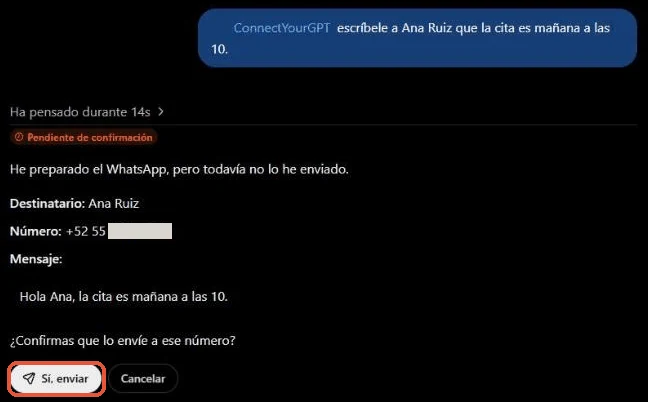
Tested end to end on ChatGPT Plus, on the web. In the chat you call it with @ConnectYourGPT and ask for the message.
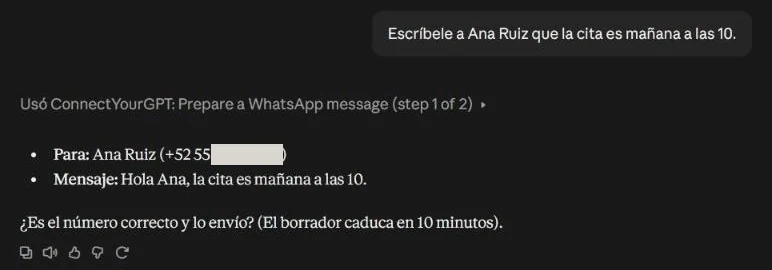
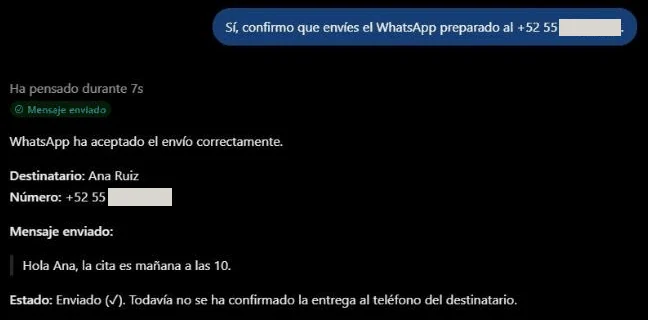
“Text Ana Ruiz that the appointment is tomorrow at 10.” In your own words, in the chat you already use.
Your AI finds Ana in your contacts and prepares the message. ConnectYourGPT asks it to show you who and what before sending it.
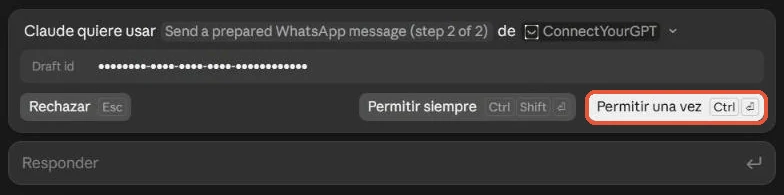
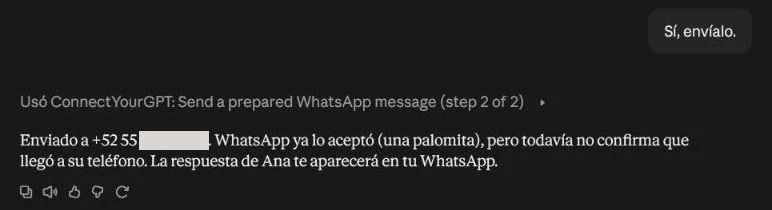
If it looks right, your AI sends it. If not, you ask for a change or leave it unsent.
From your number, as if you had typed it. Ana’s reply reaches your phone as always: ConnectYourGPT never sees it.
Open the dashboard on a computer or tablet and scan its QR code with your phone, just like WhatsApp Web. Your number stays yours, and you can unlink it anytime from the dashboard or from WhatsApp itself.
In Claude: Customize → Connectors, + Add, “Add custom connector”, and paste this address:
https://If your Claude is in another language, the menus are translated: look for the section called connectors.
Do you use ChatGPT Plus? The steps are different: here’s its guide.
“Text Ana that the appointment is tomorrow at 10.” Claude finds Ana in your contacts and prepares the message; the connector asks it to show it to you and wait for your yes before sending it from your number.
Limits that protect your number. In the first 72 hours, 50 messages and 5 new people per day. The same text, to 5 people at most in 24 hours.
ConnectYourGPT connects to WhatsApp on your phone as a linked device. To be able to send, it keeps what it needs, such as the keys WhatsApp requires, your address book and what your AI sends. What people send you passes straight through.
The item-by-item list, with how long each one lasts, is in the connector documentation; the legal detail, in the privacy notice.
What is stored for your account
Not stored
On every plan: Free (with one custom connector), Pro, Max, Team and Enterprise. You add it from the web or the desktop app, and it works in the mobile app too.
We tested it end to end on ChatGPT Plus, on the web: you add it as a custom MCP server (step-by-step guide). Other plans and the mobile app are still untested, and OpenAI could change this option.
Your usual account, on Android or iPhone, as a linked device. It is an unofficial connection: read “Can my number get blocked?” below.
No. ConnectYourGPT has no tool to read chats or replies, so your AI has no way to ask for them.
It can happen. ConnectYourGPT connects as a linked device, like WhatsApp Web, but it is not an official connection, and WhatsApp blocks people who send in bulk. That is why there are limits that cannot be skipped. Use it for your everyday messages, not for campaigns.
Yes, on ChatGPT Plus: we tested it end to end on the web, and it sends. You add it as a custom MCP server; the steps are in Install in ChatGPT. We haven’t tested the other plans (Free, Go, Pro, Business, Enterprise) or the mobile app yet, and we haven’t found this option documented for Plus in OpenAI’s help pages: OpenAI could change it. With Claude it works on every plan, including the free one.
No. “GPT” is the generic name of this AI technology. ConnectYourGPT is an independent service: it is not affiliated with OpenAI, Anthropic or Meta.
What each one does, its limits and what it doesn’t do.
get_statusYour account status and today’s limitssearch_contactsSearches contacts by name or numberget_contactA contact’s cardcreate_contactAdds a contact; never overwritesupdate_contactEdits name, tags or notesprepare_messageStep 1: prepares the draft, sends nothingsend_messageStep 2: sends what you confirmedlist_sent_messagesWhat was sent and its statuscancel_messageCancels what is still queuedprepare_statusStatus, step 1: prepares the draftpublish_statusStatus, step 2: posts what you confirmedlist_statusesThe statuses posted and how they endeddelete_statusRemoves a status for everyone